Inventory is one of the largest assets in trading and manufacturing companies. It needs a proper management system, regular monitoring, stock counts, and tracking of product flow. Any error in calculating its value affects profits, the balance sheet, and purchasing and pricing decisions. That is why finance teams look for inventory valuation methods that best fit their business and a system that applies them accurately without manual intervention.
Managing All Warehouse Operations with Odoo
Odoo’s Inventory app provides an integrated system that covers the goods cycle from arrival to departure. Its key features include:
Receipts and deliveries: Create receipts from purchase orders and deliveries from sales orders, with quantities updated as soon as each operation is confirmed.
Internal transfers: Move goods between locations and warehouses with full movement tracking.
Lot and serial number tracking: Know the source and expiry date of every item, which is essential for pharmaceuticals, food, and electronics.
Reordering rules: The system suggests purchases automatically when stock falls below the minimum level.
Cycle counts and full inventory counts: Reconcile differences between actual and recorded quantities with clear journal entries.
Barcodes: Speed up receiving, picking, and counting, and reduce manual entry errors.
Landed costs: Allocate shipping, customs, and insurance to the product cost so inventory value is closer to reality.
These operations are not separate from finance. Every stock movement affects inventory value, which is where choosing the right valuation method comes in.
Inventory Valuation Methods and How Odoo Supports Each
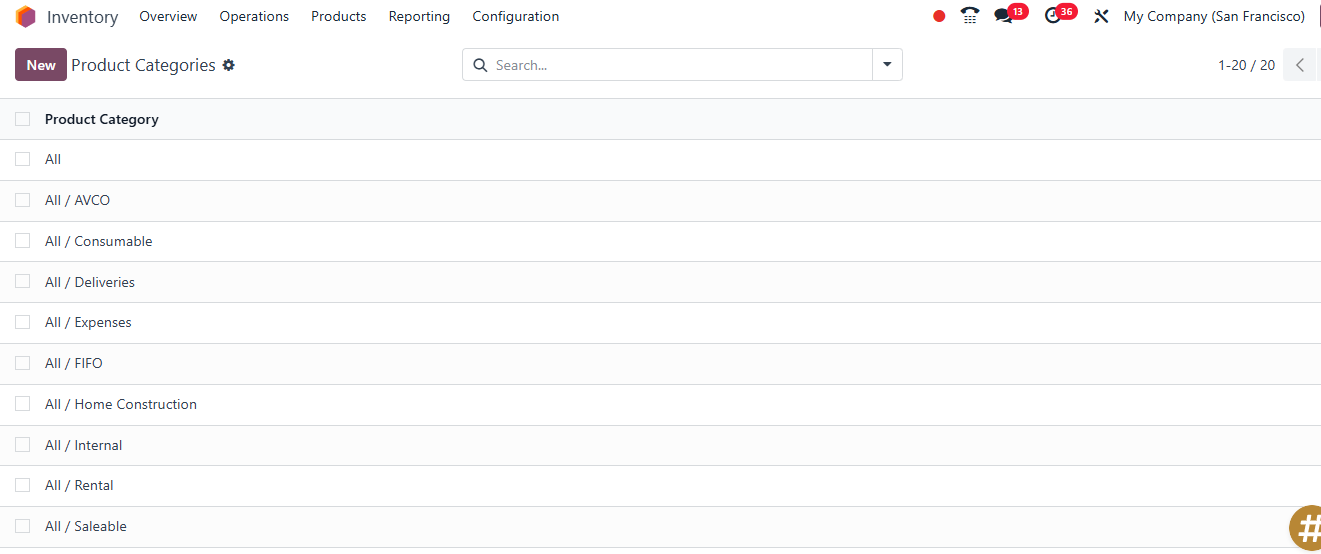
Inventory valuation is determining the financial value of the goods in your warehouses on a given date. The result varies depending on the method used, so Odoo lets you choose the method at the product category level. You can use a different method for each product group.
1. Standard Cost
A fixed cost is set manually for the product and used in all movements. Any difference between the actual purchase price and the standard cost is recorded as a price variance. This method suits manufacturers that work with fixed budgets and estimated costs, and it is the simplest to implement.
2. Average Cost (AVCO)
Odoo automatically recalculates the product’s average cost with every receipt, so outgoing units are valued at the current average cost of the stock. This method suits homogeneous products whose purchase prices fluctuate constantly, because it smooths out price swings and gives a stable cost.
3. First In, First Out (FIFO)
This method assumes the oldest batch to enter the warehouse is the first to leave. Cost of sales is calculated at the price of the oldest batches, while the inventory shown on the balance sheet reflects the prices of the most recent batches. Odoo tracks cost layers for each receipt, so you know exactly how much remains from each batch and at what price. FIFO suits perishable goods and goods with expiry dates, and it works well in inflationary environments because it reflects a more current inventory value.
What About LIFO?
The Last In, First Out (LIFO) method is not permitted under International Financial Reporting Standards (IFRS), so Odoo does not include it among its standard valuation methods. If your company needs it for tax reasons in a particular country, consult your certified accountant before any customization.
Manual vs. Automated Valuation
In addition to choosing the costing method, Odoo offers two modes for recording accounting entries:
Manual valuation: Inventory accounting entries are still recorded manually. This is typically used when you want to keep warehouse operations and accounting separate.
Automated valuation: The system generates journal entries automatically with every receipt or delivery. This is the better option for companies that want real-time accounting accuracy.
Before adopting any method, review your company’s accounting policy and agree on it with your certified accountant, because changing the valuation method after go-live requires accounting adjustments.
Integration Inventory Management and Accounting
Odoo’s advantage is that inventory and accounting run in a single database, so there is no need for external integrations or double entry. When automated valuation is enabled, the following happens:
When goods are received: An entry increases the inventory account against the “stock received but not invoiced” account until the vendor bill arrives.
When goods are delivered to the customer: A cost of goods sold (COGS) entry is recorded, and the inventory account is reduced by the value of the outgoing units according to the selected valuation method.
During stock counts and adjustments: An inventory adjustment entry is created automatically with the correct value.
When landed costs are added: They are added to the inventory value, and the cost is updated accordingly.
The accounts used are determined by the product category (inventory valuation account, plus input and output accounts). As a result, the trial balance matches the inventory report at any moment, which noticeably shortens monthly closing and annual audit time.
Automating Operations Across All Warehouse Branches
When you have multiple branches and warehouses, automation becomes a necessity rather than a luxury. Odoo supports this through:
Multiple warehouses and locations: Manage an unlimited number of warehouses, each with its own locations, shelves, and managers.
Paths: Define ready-made rules such as two- or three-step receiving (receive → quality check → store), and multi-step picking and delivery.
Putaway rules: Automatically direct items to the right place within the warehouse.
Reordering rules: Trigger purchase or manufacturing orders automatically based on each warehouse’s minimum and maximum levels.
Inter-branch transfers: Create transfers between warehouses, with goods “in transit” visible in reports.
Permissions and alerts: Define who approves movements and adjustments, and alert managers about shortages or approaching expiry dates.
This gives company management a view of every branch’s inventory on a single screen, with unified or branch-specific valuation depending on company policy.
Odoo Reports for Warehouse Management
Odoo’s reports help management turn warehouse data into decisions. The most important ones include:
Inventory valuation report: Shows quantities and total value for each product under the chosen valuation method, and can be filtered by date, warehouse, and category.
Stock report: Available, reserved, and forecasted quantities for each location.
Stock movement analysis: Detailed tracking of every inbound, outbound, and adjustment movement.
Forecast report: Projects future quantities based on purchase, sales, and manufacturing orders.
Performance and operations reports: Such as order preparation time, error rate, and receiving speed.
Customizable dashboards: Show each manager the indicators that matter for their role.
Any report can be exported to Excel or PDF, and favorite filters can be saved to repeat the analysis easily.
FAQs About Inventory Valuation Methods
Can the valuation method be changed after go-live?
Technically, yes, but it affects the recorded inventory value and may require adjustment entries. It is best to decide on the method with your certified accountant before launch and make any change at the start of a fiscal period.
Does Odoo support real-time inventory valuation?
Yes. With automated valuation, accounting entries are recorded with every movement, and you can generate the valuation report for a specific date.
Do shipping and customs costs affect inventory valuation?
Yes, through the Landed Costs feature, which allocates these expenses to the received products and raises their actual cost.
Is Odoo suitable for small companies, or only large ones?
It suits both. You can start with the Inventory app alone and expand gradually to purchasing, sales, manufacturing, and accounting.
Conclusion
Choosing the right inventory valuation method directly affects the accuracy of your profits, your balance sheet, and your operational decisions. Odoo offers an integrated solution that combines the three valuation methods, automated accounting integration, branch-level automation, and detailed reporting in a single system.
If you are planning to implement Odoo to manage your warehouses or want to review your current valuation settings, contact Centione, who specializes in implementation, to choose the method that best fits your business and configure the system correctly from the start.